I keep both answers to the virtualization software question on one box, which makes the comparison easy to measure. The Proxmox host is pve-manager/9.2.5, kernel 7.0.14-6-pve, with 31 GB of RAM total — free -g reports 20 used and 11 available. It runs 20 containers and 1 VM. The game server is CT 161, an unprivileged LXC named gamelab, with four cores, 8192 MB of RAM, 2048 MB of swap, a 60 GB rootfs on local-lvm, and features=nesting=1,keyctl=1. It runs a DayZ dedicated server under LinuxGSM.
What the container actually costs
The 60 GB rootfs is provisioned, not allocated. lvs reports vm-161-disk-0 at 60.00g with data_percent 18.31. Real consumption is 9.7 GiB. That gap is the point of thin provisioning, and the live backup and restore numbers for this same container are split out in that post.
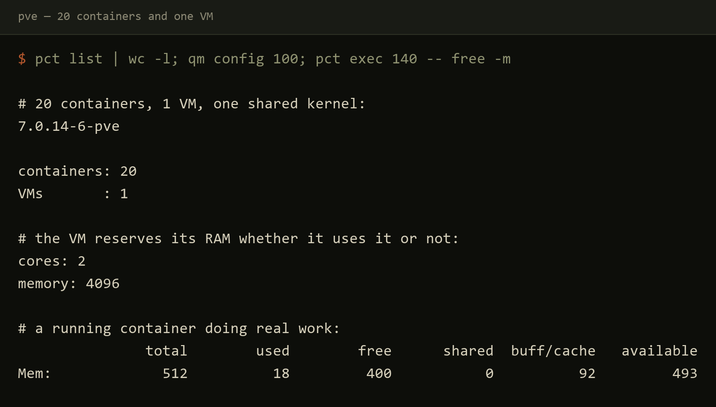
RAM is a limit, not a reservation. CT 140 syslog is configured with 512 MB. While it is running a real rsyslog collector receiving from another host, free -m inside it reports 512 total, 18 used, 401 free, and 493 available. Eighteen megabytes for a working Debian doing a job.
A stopped container costs nothing. I leave CT 161 stopped between sessions because DayZ holds roughly 4.8 GB at zero players. Stopped, it holds none, and the RAM returns to the host immediately.
Boot is six seconds, measured by starting a container and polling systemctl is-system-running until it reported running.
Live backup with vzdump --mode snapshot completed in 97 seconds and reported status = running — freeze, LVM snapshot, thaw, copy. The game server did not stop. Restoring the same 9.7 GiB took 59 seconds, then 6 seconds to boot, for a 65-second recovery.
The VM’s memory is committed
VMID 100 is TrueNAS-Scale. From qm config 100, it has 2 cores, 1 socket, memory 4096, ostype: l26, and scsi0: local-lvm:vm-100-disk-0,iothread=1,size=32G,ssd=1. That 4096 MB is reserved for the guest. A VM boots its own kernel into memory the hypervisor has handed over. That is not a flaw; it is the reason the VM is there.
One kernel, no kernel log
A container shares the host’s kernel, and every limitation I hit traces back to that. Inside CT 161:
# inside the container
$ uname -r
7.0.14-6-pve
$ journalctl -k -n 2
-- No entries --

# on the Proxmox host
$ uname -r
7.0.14-6-pve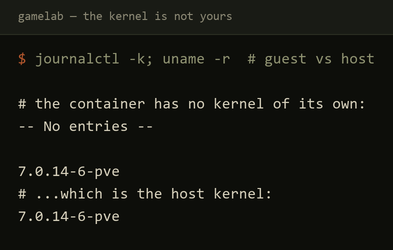
journalctl -k always returns -- No entries --, because the guest has no kernel log of its own to read. rsyslog’s stock Debian config fails on every start with imklog: cannot open kernel log (/proc/kmsg): Permission denied and activation of module imklog failed. It is not fatal — systemctl is-active rsyslog still reports active — but it is noise on every restart and there is no fixing it, only disabling it. That is the imklog failure documented in that post.
You also cannot load a kernel module, run a different kernel version, or debug anything at kernel level inside the guest. If a workload needs any of that, it needs a VM.
When each is right
Twenty containers fit on this host next to one VM because they are not each carrying a kernel. A DayZ dedicated server is a plain userspace process with a big working set — it does not need its own kernel, so it does not pay for one. A workload that needs kernel modules, a different OS family, or genuine isolation from the host does, and that is what VMID 100 is for.
None of this is a security comparison. An unprivileged container is a meaningful boundary, but not the same boundary a VM gives you, and I measured none of that.