CT 161 is the DayZ server. It’s an unprivileged LXC with a 60 GB rootfs on local-lvm, and it sits stopped most of the time. The host runs Proxmox pve-manager/9.2.21 with kernel 7.0.14-20-pve. Every Sunday at 02:00 the host’s vzdump job picks CT 161 up and writes an archive to the CIFS share /DataHDD500G1, which is served by a TrueNAS VM on the same host. The share currently holds three weekly archives for CT 161 in /DataHDD500G1/backup/dump/:
-rwxr-xr-x 1 root root        737 Sep 27 02:18 vzdump-lxc-161-2026_09_27-02_16_37.log
-rwxr-xr-x 1 root root 6417082635 Sep 27 02:18 vzdump-lxc-161-2026_09_27-02_16_37.tar.zst
-rwxr-xr-x 1 root root        737 Oct  4 02:20 vzdump-lxc-161-2026_10_04-02_19_24.log
-rwxr-xr-x 1 root root 6417083663 Oct  4 02:20 vzdump-lxc-161-2026_10_04-02_19_24.tar.zst
-rwxr-xr-x 1 root root        888 Oct 11 02:21 vzdump-lxc-161-2026_10_11-02_20_18.log
-rwxr-xr-x 1 root root 6417079947 Oct 11 02:21 vzdump-lxc-161-2026_10_11-02_20_18.tar.zst
Each archive read 10,422,661,120 bytes (9.8 GiB) and landed at 5.98 GB because that’s how vzdump rounds. The last three differ by about a kilobyte. The box didn’t change between them. I measured what the first manual backup of this box cost in time and space and wrote it up as what that backup cost.

I lost a forum years ago by migrating it without a backup. The Internet Archive later showed it had held 1,453 posts.
The job
The file /etc/pve/vzdump.cron contains this:
0 2 * * 7  root vzdump --all 1 --prune-backups 'keep-last=3' --compress zstd --quiet 1 --storage DataHDD500G1-backup --mode snapshot --exclude 100,101,106,107,130,131,132
0 2 * * 0  root vzdump 100 --mode snapshot --storage local --compress zstd --prune-backups keep-last=1 && cp /var/lib/vz/dump/vzdump-qemu-100-*.vma.zst /DataHDD500G1/backup/dump/ && ...
0 2 * * 0  root tar czf /DataHDD500G1/backup/pve-config/pve-$(date +\%Y\%m\%d).tgz /etc/pve/ && ...
The main line keeps the last three archives per guest, uses zstd, and takes snapshots for running guests. VM 100 is excluded, because VM 100 is the NAS that serves the share, and a NAS backup that only lives on the NAS is not a backup. That VM gets a separate line that writes to the host’s local disk first and then copies to the share. The third line tars /etc/pve weekly; three tarballs are kept, and the last three are 19,819 B, 19,491 B, and 19,095 B. The file says “Automatically generated file – do not edit”, and those last two lines were added by hand. If anyone edits the job in the web UI, the file is rewritten and those two lines vanish. That’s a known, open risk.
I counted every weekly run from the task logs in /var/log/pve/tasks/. For each run: number of filesystem type on dumpdir is 'cifs' lines, number of Finished Backup of VM lines, number of pruned 1 backup lines, and the last line of the task.
| Date | cifs lines | Finished Backup lines | pruned 1 backup lines | Last line |
|---|---|---|---|---|
| 2026-08-02 | 13 | 13 | 9 | TASK OK |
| 2026-08-09 | 16 | 16 | 10 | TASK OK |
| 2026-08-16 | 15 | 15 | 10 | TASK OK |
| 2026-08-23 | 15 | 15 | 14 | TASK OK |
| 2026-08-30 | 0 | 8 | 0 | TASK ERROR: Connection refused |
| 2026-09-06 | 14 | 14 | 14 | TASK OK |
| 2026-09-13 | — | 0 | — | TASK ERROR: could not activate storage ‘DataHDD500G1-backup’ |
| 2026-09-20 | 15 | 15 | 14 | TASK OK |
| 2026-09-27 | 15 | 15 | 14 | TASK OK |
| 2026-10-04 | 15 | 15 | 14 | TASK OK |
| 2026-10-11 | 15 | 15 | 15 | TASK OK |
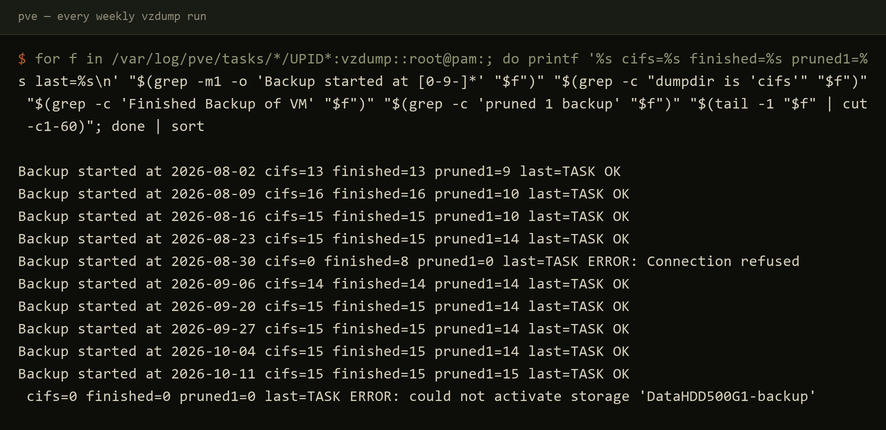
The cifs line is printed for each running guest backed up in snapshot mode when the dump directory is on CIFS. Stopped guests like CT 161 don’t print it. It’s the only line in the whole log that says what filesystem the archive is going to.
The night of 2026-08-30
On 2026-08-30 the cifs count is 0. The finished count is 8. The pruned count is 0. The task ended TASK ERROR: Connection refused. Log lines from a good week and from that night:
2026-08-23:
INFO: filesystem type on dumpdir is 'cifs' -using /var/tmp/vzdumptmp3347512_102 for temporary files
INFO: creating vzdump archive '/DataHDD500G1/backup/dump/vzdump-lxc-102-2026_08_23-02_02_46.tar.zst'
INFO: Finished Backup of VM 102 (00:01:07)

2026-08-30:
INFO: creating vzdump archive '/DataHDD500G1/backup/dump/vzdump-lxc-102-2026_08_30-02_00_02.tar.zst'
INFO: Finished Backup of VM 102 (00:00:29)
The archive path is identical. The only difference is the line that is not there. Each of the eight guests — 102, 104, 108, 109, 112, 113, 117, 118 — printed Finished Backup, each printed pruned 0 backup(s). The directory it saw had no older archives to prune, because it was not the share. CT 112 alone wrote 18,011,064,320 bytes (17GiB, 82MiB/s), archive file size 6.85GB.

That’s not why I noticed. I noticed because CT 119 froze its filesystem and hung on create storage snapshot 'vzdump' from 02:08:20 until INFO: Failed at 2026-08-30 08:16:26 — about six hours — and the task ended TASK ERROR: Connection refused. That hang is a separate fault. It held the global vzdump lock the whole time, so the VM 100 backup that night died waiting for it, and the job never reached CT 161. The hang is the only reason anyone looked. Had CT 119 snapshotted normally, the job would have ended TASK OK and the eight “backups” would have sat in a directory on the host’s root disk.
Why was the share missing? The host booted on 2026-08-28. Proxmox’s status daemon polled the backup storage about 15 seconds into boot, which triggered the CIFS automount. VM 100 started at 01:53:31 and was not yet answering, so three mount attempts failed with -113 (host unreachable) and stopped. /DataHDD500G1 stayed an empty directory on the host’s root disk. On Sunday at 02:00, vzdump wrote into it.
The detector after the fact was df / against du -shx /: 40G versus 26G, 14G shadowed underneath the mountpoint once the share was mounted over it. du -shx cannot see files hidden under a mount; df counts them. The same maintenance log records that it had happened before: a 1.8 GB archive from June had been sitting hidden under the mountpoint since then. That’s from the maintenance log from that day, not something I re-measured.
The fix
One line in /etc/pve/storage.cfg:
$ sudo grep -A3 'dir: DataHDD500G1-backup' /etc/pve/storage.cfg
dir: DataHDD500G1-backup
	path /DataHDD500G1/backup
	content backup
	is_mountpoint /DataHDD500G1
With is_mountpoint set, Proxmox refuses to use the storage unless that path is actually a mount.
The proof came on 2026-09-13. The share was down again — the maintenance log records it unavailable 09-09 to 09-15. The task log of the main job, entire:
INFO: notified via target `mail-to-root`

TASK ERROR: could not activate storage 'DataHDD500G1-backup': unable to activate storage 'DataHDD500G1-backup' - directory is expected to be a mount point but is not mounted: '/DataHDD500G1'
Nothing was written anywhere. The failure has a sentence in it that says exactly why.

What it cost the DayZ box
CT 161 has a backup from 2026-08-23 (00:01:16), and the next one is 2026-09-20 (00:01:26). That’s 28 days apart. On 2026-08-30 the job died before reaching it. On 2026-09-06 CT 161 was on that week’s exclude list — the journal shows --exclude 100,101,106,107,130,131,132,161. On 2026-09-13 the guard refused the whole job. It cost nothing only because the box was stopped and unchanged. A running server with players would have lost four weeks of recoverable state, and nothing would have said so on two of those nights.
An archive is only useful if it restores; I timed a restore of an earlier archive of this same box.
Three things are still open. There’s no timeout on the cron line: one hung guest still holds the global lock and can starve every backup after it, exactly as it did on 2026-08-30. The hand-added lines in the generated file are still at risk of being silently removed. And three archives on one share served by a guest of the same host is not an offsite copy.
For choosing or running a backup system, the job’s success message describes what the job did, not where the bytes went. You need to verify that the destination is the destination, and that a failure is loud. On my host, one line of storage config turned a silent wrong-disk write into a refusal with a reason.