Every DayZ server owner sizing a box asks the same question, and every answer on the internet is a guess: how much RAM do mods add? The advice you get is usually a proportion — “budget an extra gigabyte for a big mod pack” — which sounds sensible and turns out to be wrong in both directions.
I measured it. Four configurations, same box, same procedure, cold start each time, nobody playing. The vanilla baseline is the same server I measured a couple of days ago at 4,686 MB, so the numbers are comparable to what came before.

What was measured
The lab box is gamelab — an unprivileged LXC container on Proxmox, Debian 12.7, 4 cores, 8 GB RAM, running the DayZ server under LinuxGSM v26.2.0 on Chernarus with no players connected.
The mods are all straight from the Steam Workshop, and they span four orders of magnitude on disk:

The four rungs:
- vanilla — no mods at all.
- CF only — Community Framework, 556 KB. Almost every other mod depends on it.
- admin + trader — CF, Dabs Framework, Community-Online-Tools, VPPAdminTools and Trader. About 118 MB. This is roughly what a small community server actually runs.
- Expansion — CF, Dabs Framework and the DayZ-Expansion-Bundle, 2.7 GB. The heaviest thing on the Workshop.
Each run stops the server, writes the mod list into LinuxGSM’s config, cold starts, waits until the server answers a Steam query, then samples resident memory every 15 seconds for nine minutes. Peak and final came out identical every time, which is the useful part: DayZ climbs for about four minutes after start and then flattens. If you measure at 60 seconds you will read about 3.5 GB and conclude something cheerful and false.
The finding: RAM cost is wildly sublinear
Line the four up against what they weigh on disk and the “proportion” model dies immediately:
| Configuration | Mods on disk | Resident memory | Added vs vanilla | RAM per MB of mod |
|---|---|---|---|---|
| vanilla | — | 4,692 MB | — | — |
| CF only | 0.5 MB | 4,716 MB | +24 MB | 48× |
| admin + trader | 118 MB | 4,847 MB | +155 MB | 1.3× |
| Expansion | 2,720 MB | 4,962 MB | +270 MB | 0.1× |
A 556 KB mod costs 24 MB of RAM — forty-eight times its own size on disk. A 2.7 GB mod pack costs 270 MB — a tenth of its size. Expansion is about 5,400 times larger than CF on disk and costs eleven times as much memory.
That inversion is the whole story, and the reason is visible in the PBO count. Vanilla mounts 126 PBOs. Expansion takes that to 376. Most of those extra packages are assets — models, textures, sounds — which the server reads from disk as it needs them and never holds resident in bulk. A dedicated server does not render anything. What it does hold are script classes and config entries, and those are resident from the moment they load, whether the mod is half a megabyte or three gigabytes.
Community Framework is nothing but script. It ships almost no assets at all, which is exactly why 556 KB on disk turns into 24 MB in memory.
So the practical rule is not a percentage. It is: count the scripting mods, not the gigabytes. Five script-heavy admin mods at 118 MB cost more per megabyte than the largest asset pack in the game.
The headline number for capacity planning: the biggest mod pack in DayZ raised idle memory by 5.8%. If vanilla fits on your box, mods will fit too. It is the players that will cost you, not the Workshop.
Startup time is where mods actually hurt
Memory barely moved. Cold start did:
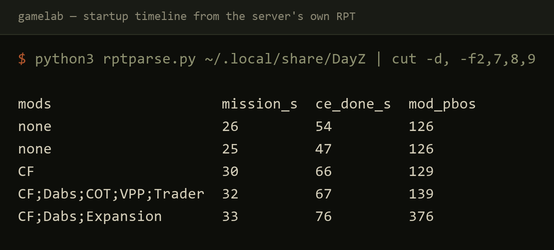
Vanilla has the world restored 47 seconds after launch. Adding Community Framework alone — that 556 KB again — pushes it to 66 seconds. The full Expansion stack reaches 76 seconds, a 62% longer cold start than vanilla.
Note which column moves. Script compilation (mission_s) drifts from 25 to 33 seconds, but the gap between script compilation and a restored world stretches much further. Mods are not slow to load; they are slow to initialise, because every added scripted item, vehicle and building has to be spawned and placed by the central economy before the server is genuinely ready.
Two caveats I’d rather state than hide. The first start after a reboot is slower than every start after it — earlier runs of this same vanilla server took 12 to 19 seconds to load the landscape against today’s 8 to 9, purely because the OS file cache was cold. And a few percent of run-to-run drift is normal; size for the higher figure.
Your uptime monitor will lie to you
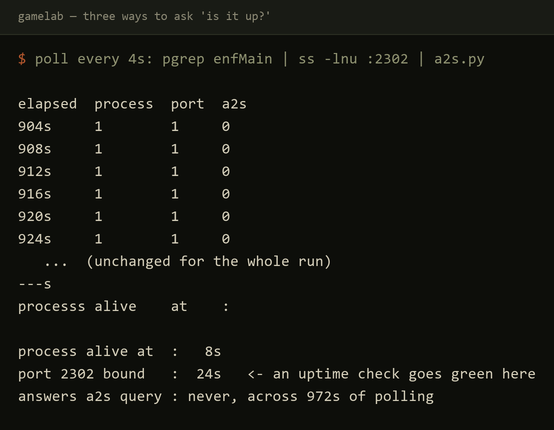
Worth knowing regardless of mods: the server answers Steam’s A2S query about nine seconds before it has finished loading the mission, and roughly thirty seconds before the world is restored. In the vanilla run the query port responded at 16 seconds, the mission module finished at 25, and the central economy finished at 47.
Anything that pings the query port and calls the server “up” is telling you the engine has bound a socket, not that a player can join. If you restart on a schedule and your monitor reports green, that green arrives about half a minute early.
17,224 warnings is not a broken server
The last column of the results table is the one that looks alarming:
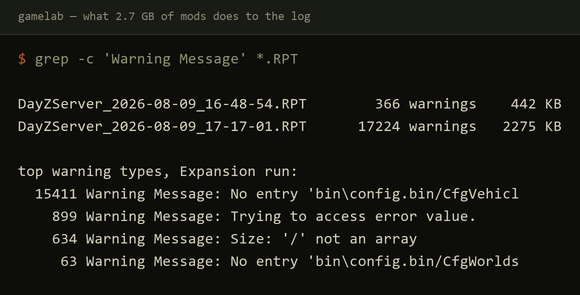
Vanilla logs 366 warnings on a clean start. The Expansion run logs 17,224 — a 47-fold increase, and the RPT grows from 442 KB to 2.2 MB. Nothing is broken. 15,411 of them are one category: No entry 'bin\config.bin/CfgVehicles/...', the engine noting a config inheritance path a mod references but does not define. The other recurring pair, Trying to access error value (899) and Size: '/' not an array (634), are script-side equivalents.
This matters for a practical reason: if you go looking for a real fault in a modded server’s log, you are searching for one line among seventeen thousand that are all expected. Grab a clean baseline count for your own mod set on a working start, and then watch for changes to it, because the absolute number is meaningless.
Traps worth writing down
Steamcmd moved its data root and left the login behind. This box last logged into Steam on 2026-08-07 and had cached credentials so it could run unattended. Two days later steamcmd updated itself on launch and started using ~/.local/share/Steam instead of ~/Steam — and the cached token was in the old directory. The symptom is Cached credentials not found followed by ERROR (Invalid Password), on an account whose password has not changed. The fix is to copy config.vdf from the old root into the new one. Nothing about the error message points at this.
Symlinked mods work. Workshop content downloads to a directory named after the numeric item ID. You do not have to copy 2.7 GB into serverfiles/mods/ to give it a readable name — a symlink to @Name mounts identically, and saves the disk.
Don’t hide the start command’s output. My first attempt ran LinuxGSM’s start with output sent to /dev/null, so when a run silently did nothing, there was nothing to read. That cost more time than the measurement did.
What I did not measure
Idle CPU, honestly, because I could not get a trustworthy number. ps derives %cpu by dividing CPU time by elapsed time, and this container reports the DayZ process as having been alive for 441 million days, so the column comes back as zero. Measuring it properly means sampling /proc/<pid>/stat directly, and it is a separate run.
Also unmeasured: anything with players on it, and a full map swap. Namalsk was downloaded — 2 GB of it — before I found that the Workshop item ships no mission folder, so a map change needs files from outside the Workshop and a server config change. That is a different article rather than a footnote in this one.
Reproducing it
The whole harness is three small scripts on the lab box: a 10-line Python A2S probe to detect readiness, a measure.sh that stops, reconfigures, cold starts and samples, and a parser that reads the startup timeline out of the server’s own RPT log. Four runs, about forty minutes unattended.
That is the point of having a lab. The number in the headline is not an estimate.