The Terraria developers announced Crossplay Phase One on November 24, 2026, in a Steam news post. The update introduces cross-platform multiplayer over local networks, a redesigned multiplayer menu on PC, and new settings on consoles and mobile.
What Changed
Crossplay Phase One lets players on Xbox, PlayStation, Switch, Android, Apple, PC and Mac join the same multiplayer session when connected to the same Wi-Fi or wired network. No multiplayer subscription is needed for local play. The developers note that in some circumstances a local session may not appear in the multiplayer menu.
Players who know how to configure their router can also share an IP address to connect as a server. Phase Two of Crossplay will focus on making online cross-platform play easier across the internet, with details to come later.
The PC multiplayer menu has been redesigned. Players can join a world hosted by a platform friend or a local session directly from the list. An Add Server button allows entering an IP address, and previously remembered servers appear below friends.
PC dedicated servers are included with caveats. PlayStation and Xbox players connecting to an online PC server need an online subscription because they must use Microsoft’s and Sony’s services. Switch cannot connect to privately hosted dedicated servers, local or online, due to Nintendo’s security restrictions. Switch can only join a player-hosted world on Switch or another platform. The Chinese mobile versions are not affected because they use a different multiplayer method.
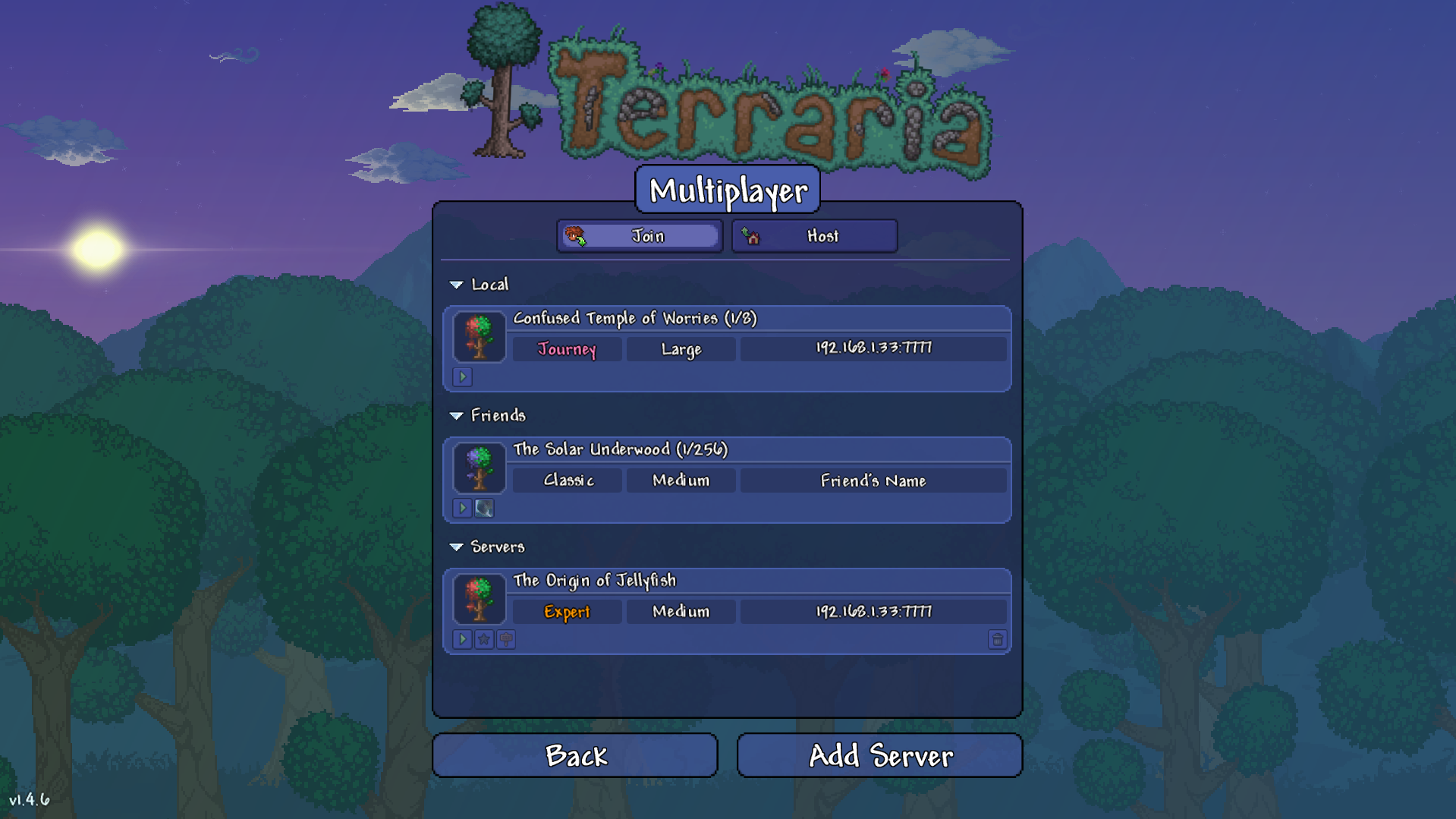
Server hosting service addresses can be entered manually with the + Add Server button at the bottom of the multiplayer menu. The entry is remembered for future sessions.
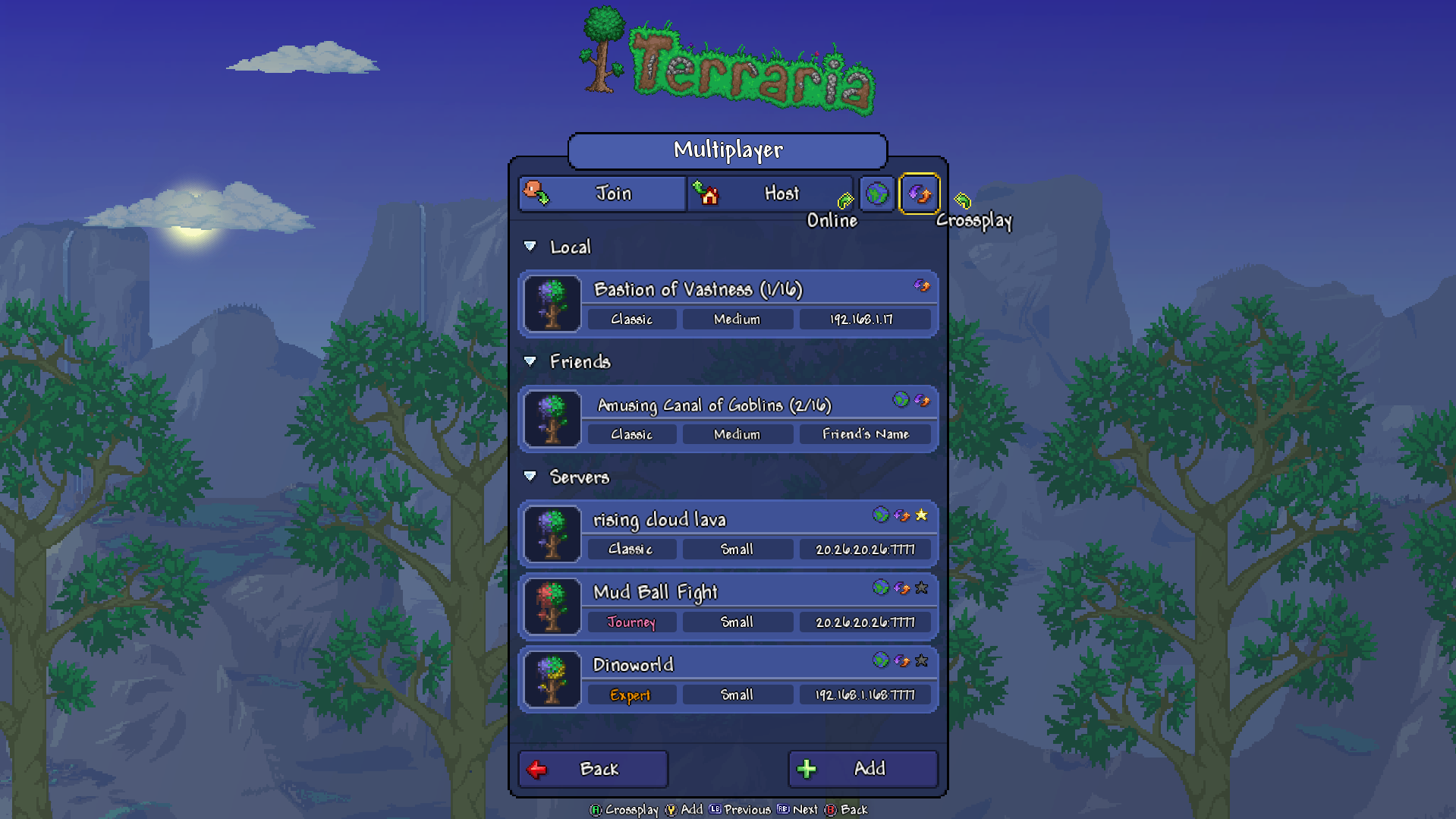
Consoles and mobile have two new buttons in the top-right to enable Online and Crossplay. On mobile these settings are always on and cannot be disabled. On console, disabling Crossplay shows only friends’ games and restricts hosted games to platform friends. Disabling Online shows and hosts only local games. Without an online subscription, Online is disabled. On Xbox the Crossplay button may be off by default and must be selected to enable Crossplay.
The update also adds a “creepy crawlies” seed that increases spider caves. The “Arachnophobia” seed no longer contains spider caves and prevents spider-like enemies from spawning: Wall Creeper, Black Recluse, Jungle Creeper and Blood Crawler.
Balance changes include gem staff shots that stop homing if they become hostile, distressed pal defense reduced to 0, Armored Skeleton Heavy variant health scaling with difficulty, and several whip minions no longer reapplying whip tags.
Bug fixes cover Pyroclastic Stone side strikes, Lucky Coin drops, Chlorophyte Leaf Crystal shots, Explosive Bullets, Javelin rotation, Sky Dragon’s Fury glowmask, Kraken achievement, Jack O’ Lantern spelling, Blood Moon Monolith, hoppers destroying platinum coins, Possession’s eye beams, Ale Tosser projectiles, minion desync, lava dusts, For The Worthy trees and pot bombs, multiplayer weapon issues, Party Girl’s cake, Water Bolts, Stardust Guardian, Lightning Strike sounds, invasion enemies, server crash, Aether stars, carried sentries, Rainbow Phasesaber, Stardust Dragon segments, Old One’s Army event, item animation, Paladin’s shield, Nettle Burst and Crystal Vile Shard armor penetration.
Who It Affects
Players on Xbox, PlayStation, Switch, Android, Apple, PC and Mac with version 1.4.6 can use local crossplay. PlayStation and Xbox players need an online subscription for online dedicated servers. Switch players cannot join privately hosted dedicated servers. Mobile players cannot disable Online or Crossplay settings.
Starting today, for most people using the same Wi-Fi/wired network you will be able to play together with any device which has v1.4.6 Terraria.
For every Terraria announcement, check the Terraria update tracker.