I built a DayZ server this afternoon on a clean Debian 12 container to see what it actually costs to run. Not what a hosting page says it costs — what the process reports when it’s sitting there with nobody connected.
The answer is 4,842 MB resident, at zero players.
That’s the number I couldn’t find anywhere before starting, so here it is along with everything else I measured, and the five things that went wrong on the way.
The numbers
Vanilla Chernarus, no mods, no players connected, freshly started:
RSS (resident memory)     4,842 MB
Disk (serverfiles)          3.8 GB
Cold start to "Mission read"   62 s
Console log, clean start   5,347 lines
  of which warnings            2,001
Container: Debian 12.7, 4 cores, 8 GB RAM, unprivileged LXC on Proxmox. The server took 59% of the container’s memory before a single player joined.

numfmt because a six-digit KB figure hides what it actually is.I ran it a second time the following day to check the figure held. It does, roughly: 4,686 MB against the first run’s 4,842 MB. Expect a few percent of drift between cold starts and size for the higher number, not the lower one.
Two things follow from that. If you’re sizing a box, 4 GB is not enough for vanilla DayZ — it will start and then die the moment anything else wants memory. And if you’re comparing hosting plans, a “4 GB DayZ slot” is being sold optimistically.
The 62-second cold start is worth knowing too, because it means a crash-restart loop is a minute of downtime each time, not a few seconds.
On those 2,001 warnings: they are normal. A clean vanilla start throws thousands of lines about missing geometry components, doors without selections, and models with too many convex parts — Warning: No components in dz\structures\.... None of it indicates a problem with your install. It’s Bohemia’s own asset data complaining, and if you go hunting for the cause you will waste an evening. Log noise on this engine is not a signal.
The five things that broke
1. Anonymous SteamCMD login doesn’t work
Most dedicated servers let you pull the server files with login anonymous. DayZ doesn’t. App 223350 is gated behind a Steam account that owns DayZ itself (app 221100).
Worse, it fails at download time, not at login time — so a login that appears to succeed still isn’t proof you can pull the files.
Use a dedicated Steam account, not your personal one. The credentials end up cached on the box, and you don’t want that to be the account with your library attached to it.
2. Steam Guard cannot be automated, and needs a real terminal
The first login prompts for a Steam Guard code. There’s no way around that — it’s the point of Steam Guard.
The subtler trap: ssh host "command" does not allocate a pseudo-terminal, so the prompt has nowhere to read your keystrokes from. It reads EOF and you get a prompt you physically cannot answer. You need a TTY:
ssh -t youruser@yourbox "sudo -u dayzserver -i"Then run SteamCMD from inside that shell. After one successful login the sentry is written to ~/Steam/config/config.vdf and every subsequent +login <user> runs unattended.
3. apt install steamcmd fails, and takes your other packages with it
steamcmd is not in Debian’s default repositories. That alone is a minor annoyance. The problem is what happens if you put it in a list with other packages:
apt-get install -y lib32gcc-s1 lib32stdc++6 steamcmd
   E: Package 'steamcmd' has no installation candidate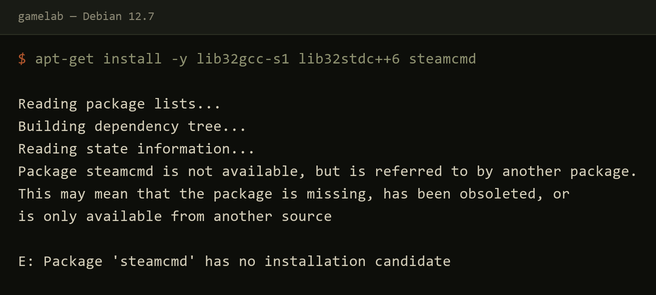
The entire call aborts. The 32-bit libraries you actually needed don’t install either, and because the error names only steamcmd, it looks like a single missing optional package. It isn’t — it’s silent collateral damage.
You don’t need the distro package anyway. LinuxGSM ships its own SteamCMD. The real dependencies are just:
dpkg --add-architecture i386
apt-get install lib32gcc-s1 lib32stdc++6
Plus, if you’re using LinuxGSM, six more it will name on first start: distro-info, libsdl2-2.0-0:i386, netcat-openbsd, pigz, unzip, uuid-runtime.
4. serverDZ.cfg is a decoy if you’re running LinuxGSM
This one cost me a restart and is the least documented.
Every DayZ hosting guide tells you to edit serverfiles/serverDZ.cfg. I did. I set the hostname, the player cap, the shard ID. Then I started the server and it announced itself as “LinuxGSM”.
LinuxGSM does not read serverDZ.cfg. It builds its own path:
servercfg="${selfname}.server.cfg"
servercfgfullpath="${servercfgdir}/${servercfg}"
Which resolves to serverfiles/cfg/dayzserver.server.cfg — a different file, downloaded from LinuxGSM’s own config repository on first start, with its own defaults. Your carefully edited serverDZ.cfg sits there being ignored.
Edit cfg/dayzserver.server.cfg. And note LinuxGSM generates an admin/RCON password into it on first run, which you’ll want to change.
5. The process isn’t called what you think
pgrep DayZServer returns nothing on a running DayZ server. The binary you launch is DayZServer, but the process that actually runs is the Enfusion engine:
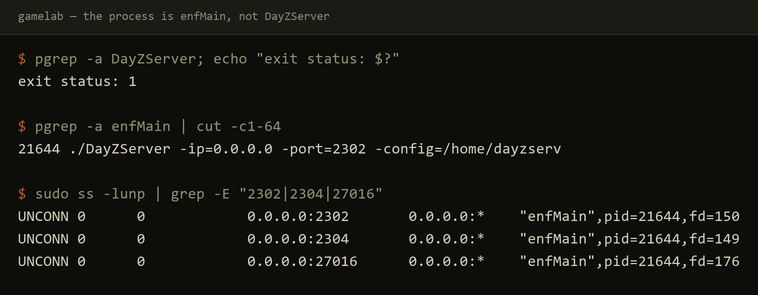
pgrep DayZServer exits 1. The listener on all three UDP ports is enfMain.If you’re writing a health check, a monitoring probe, or a restart script, match on enfMain. Matching on DayZServer will report your healthy server as down, forever. The same capture settles the ports question below: the sockets are held by enfMain, and the Steam query port is 27016.
Two FAIL lines during startup are also expected noise:
FAIL Starting dayzserver: Could not copy any steamclient.so 64bit for the gameserver
FAIL Starting dayzserver: Could not copy any steamclient.so 32bit for the gameserver
LinuxGSM prints OK for the same step immediately afterward and the server starts and runs fine. Alarming, harmless.
What ports it binds
2302/udp    game
2304/udp    (engine)
27016/udp   Steam query
Worth knowing that the Steam query port is 27016, not the 2303 that older Arma-era documentation will tell you.
One bonus
The current server build ships a sakhal directory in mpmissions alongside dayzOffline.chernarusplus and dayzOffline.enoch. The Frostline map is included in the server files — you don’t need anything extra to run it. Change the mission template and restart.
Why I’m measuring this
This box exists so I can write things down that I never wrote down the first time. We ran Chernarus and Lingor on the Arma 2 mod for years, and Namalsk and DeerIsle later, and I have almost no record of how any of it was configured — which is the ordinary fate of a decade of server admin work done in the evenings.
Next is the harder one: an Arma 2 DayZ mod private hive on Linux, in 2026. LinuxGSM supports 142 game servers and Arma 2: Operation Arrowhead is not one of them, so none of the convenience above applies. That’s exactly why it’s worth documenting — every guide for it is from 2013.