You set your server name in serverDZ.cfg. You restarted. The server came back up with a different name — something like LinuxGSM DayZ Server — and an admin password you never chose.
So you check for a typo. There isn’t one. You check the file saved. It did. You restart again, harder. Same result. Somewhere around the third attempt you start wondering whether the file is being cached, or overwritten, or whether you’re editing a copy.
None of those. Under LinuxGSM, serverDZ.cfg is never opened at all. It sits there in serverfiles/, 3 KB, correctly formatted, fully ignored.
Why every guide points you at the wrong file
This isn’t guide authors being sloppy. There are two different launchers with two different conventions, and almost every DayZ server guide was written for the other one.
Bohemia’s own server package ships a PowerShell manager, and that is what names serverDZ.cfg. LinuxGSM has its own configuration scheme and never adopted it. Grep for the filename across both and the split is immediate:

Two hits, both in server_manager/ — Bohemia’s directory, for Bohemia’s launcher. Zero hits in everything LinuxGSM owns.
So the guides aren’t wrong, exactly. They’re right for Server_manager.ps1 and wrong for you.
What LinuxGSM reads instead
LinuxGSM builds its config path from parts, and the filename it lands on is derived from the instance name rather than fixed:
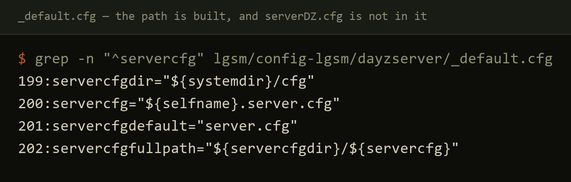
Read those four lines together:
servercfgdir→serverfiles/cfgservercfg→${selfname}.server.cfg, andselfnameis your instance name —dayzserverby defaultservercfgfullpath→ the two joined
The launch line at the top of the same file passes -config=${servercfgfullpath}. That variable is the only config path the server process ever receives.
Rather than trace it by hand, just ask:

/home/dayzserver/serverfiles/cfg/dayzserver.server.cfgThat is the file. Edit it, and your changes take.
Where the mystery settings came from
The other half of the confusion: that file didn’t come with the game. LinuxGSM downloads it from its own config repository the first time you start the server, complete with a default hostname and a generated admin and RCON password.
Which explains the two things that feel most like a bug:
- The server has a name you never set — that’s LinuxGSM’s default, not a leftover.
- The server has an admin password you never chose — also generated. It’s in that same file. Change it before you expose the box to anything.
If you edit serverDZ.cfg and restart, you don’t get a merge or a warning. You get LinuxGSM’s downloaded defaults again, because your file was never part of the conversation.
The fix
# the file that matters (dayzserver = your instance name)
nano ~/serverfiles/cfg/dayzserver.server.cfg

# confirm the path rather than trusting a guide
./dayzserver details | grep -i "config file"
Always run that second command on a new install. If you ever rename the instance, the config filename changes with it — selfname feeds directly into it — and you’ll be editing an orphan again under a new name.
You can delete serverDZ.cfg, but there’s no need. Leaving it costs 3 KB. It only costs you time if you forget which file is which, so if you like a clean box, rename it to serverDZ.cfg.unused and move on.
Two more that cost me time on the same box
While you’re in here, both of these look exactly like a broken server and are neither:
The process is enfMain, not DayZServer. pgrep DayZServer returns nothing on a perfectly healthy server. Any monitor or restart script matching the obvious name will report permanent downtime and can restart-loop a server that was fine. Match enfMain.
The Steam query port is 27016, not 2303. Game traffic is 2302/udp and the engine uses 2304/udp, but the query port that decides whether your server appears in the browser is 27016/udp. Miss it in the firewall and you get a server that runs perfectly, accepts direct connects, and is invisible in the list.
Also worth knowing before you go looking for a fault: two FAIL ... Could not copy any steamclient.so lines during startup are expected, and LinuxGSM prints OK for the same step immediately afterward. A clean start also logs around 2,000 warnings. Those are Bohemia’s asset data, not your install.
—
*Measured on a clean Debian 12.7 container running LinuxGSM v26.2.0 and DayZ server app
- If your LinuxGSM version differs, check
_default.cfgrather than trusting the paths
above — the construction is stable, but the line numbers aren’t.*